Unlock the vast potential of game development without getting bogged down in complex code. For many aspiring creators, the sheer thought of mastering C++ can be a daunting barrier to entry into the world of Unreal Engine. What if we told you there's a powerful, intuitive way to build intricate game logic, create stunning interactive experiences, and prototype ideas at lightning speed—all without writing a single line of traditional C++?
Enter Unreal Engine Blueprint. This visual scripting system has revolutionized how developers, designers, and artists alike can bring their visions to life within the industry-leading Unreal Engine. Whether you dream of crafting epic adventures, immersive simulations, or compelling architectural visualizations, Blueprint empowers you to achieve professional-grade results. This comprehensive Unreal Engine Blueprint tutorial will guide you through the core concepts, help you understand its capabilities, and equip you with the knowledge to embark on your visual scripting journey, proving that mastery of game logic doesn't always require a coding background.
What is Unreal Engine Blueprint? The Power of Visual Scripting
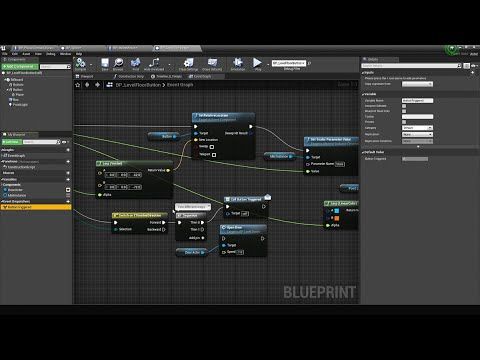
At its heart, Blueprint is Epic Games' proprietary visual scripting language, specifically designed for Unreal Engine. Imagine writing code, but instead of typing text, you're dragging and dropping interconnected nodes on a graph. Each node represents a specific function, event, or variable, and by wiring them together, you construct complex sequences of logic that dictate how your game behaves.
The beauty of Blueprint lies in its accessibility. It democratizes game development, allowing designers, artists, and even project managers to directly contribute to gameplay mechanics without needing extensive programming knowledge. This significantly speeds up prototyping and iteration cycles, as changes can be visualized and tested immediately within the editor.
With Blueprint, you can create virtually any game element or interactive feature, including:
- Game Rules & Conditions: Define win/loss states, scoring systems, or progression mechanics.
- Player Customization: Allow players to select different characters, outfits, or modify in-game properties.
- Camera Control: Implement dynamic camera angles, cinematic sequences, or player-controlled perspectives.
- Input Handling: Map player keyboard, mouse, or gamepad inputs to specific actions and abilities.
- Interactive Items: Program weapons, spells, health pickups, quest items, or environmental triggers.
- Environments: Create procedurally generated levels, dynamic weather systems, or interactable scenery.
In essence, Blueprint offers a complete ecosystem for building robust and interactive experiences, making it the primary tool for gameplay scripting within Unreal Engine.
Diving Deeper: Understanding Blueprint Types
Unreal Engine utilizes different types of Blueprints, each serving a specific purpose within your project. Understanding these distinctions is crucial for efficient and organized development.
Level Blueprint
The Level Blueprint is a unique entity tied to each individual level (or map) in your project. Think of it as the "brain" for that specific level. It acts as a global event graph for level-specific logic and interactions with Actors placed directly within that level.
For those familiar with older versions of Unreal Engine, the Level Blueprint functions similarly to Kismet in Unreal Engine 3. It's ideal for:
- Handling events specific to a single level, such as opening a door when a player walks over a trigger.
- Controlling dynamic level loading or streaming.
- Triggering cinematic sequences (using Matinee or Sequencer).
- Binding events to specific instances of Actors placed in the world, like a unique puzzle element.
While powerful for one-off level events, the Level Blueprint isn't designed for reusable gameplay elements. For that, we turn to Blueprint Classes.
Blueprint Class
The Blueprint Class is the workhorse of Unreal Engine's visual scripting. Unlike the Level Blueprint, which is unique to a single level, a Blueprint Class is a reusable asset that defines a new "type" of Actor or object. It allows you to add functionality, properties, and components to existing gameplay classes visually in the editor, without writing C++ code.
When you create a Blueprint Class, you're essentially defining a template. You can then drag and drop multiple instances of this template into any level in your game, and each instance will behave according to the logic defined in the Blueprint Class. This makes them incredibly versatile for:
- Characters: Defining player characters, NPCs, or enemies with unique behaviors.
- Interactive Objects: Creating doors, levers, collectible items, or complex machinery.
- Projectiles: Crafting bullets, magic spells, or thrown objects with specific trajectories and impacts.
- Custom Components: Building reusable pieces of functionality that can be added to other Actors.
- UI Elements: Designing widgets for menus, HUDs, and in-game displays.
For a deeper dive into these core Blueprint types and their applications, explore our article on Exploring Unreal Engine Blueprints: Level & Class Types Explained.
Kickstarting Your Blueprint Learning Journey
Embarking on your Blueprint journey can feel overwhelming given the vastness of Unreal Engine. The best approach, as seasoned developers suggest, is to treat learning resources like a dictionary—focus on what you need, when you need it, and build your knowledge incrementally.
Essential Video Tutorials & Learning Paths
Video tutorials are an excellent starting point for a hands-on blueprint visual scripting tutorial. Look for comprehensive series that cover:
- Unreal Engine Editor Basics: Familiarize yourself with the interface, content browser, and viewport.
- Blueprint Fundamentals: Understand the difference between Blueprint scripts and Blueprint classes, variables (data types, scope, exposing), events, functions (pure vs. impure), macros, and macro libraries.
- Common Node Usage: Learn the purpose of frequently used nodes for flow control, math operations, object manipulation, and event handling.
- Project-Based Learning: Many tutorials guide you through building a small game or interactive demo. This practical application is invaluable for solidifying your understanding. Examples include creating a simple character controller, interactive doors, or a basic pickup system.
- Beyond Blueprint: While focusing on Blueprint, good learning paths will often touch upon related systems like materials, particle systems, basic lighting, and sound design, showing how Blueprint integrates with them.
Leverage official Unreal Engine documentation and learning portals, as well as highly-rated community tutorials on platforms like YouTube and Udemy. Search for terms like "UE5 Blueprint tutorial for beginners" or "Unreal Engine Blueprint zero to hero" to find structured learning paths.
Recommended Practices and Tips for Mastery
- Start Simple: Begin with small, manageable projects. Try to replicate a single mechanic from a game you enjoy.
- Deconstruct & Learn: Open existing Unreal Engine sample projects (like the "Lyra Starter Game" or "Third Person Template") and analyze how the developers use Blueprint. Reverse-engineer their logic.
- Experiment Fearlessly: Don't be afraid to connect nodes and see what happens. The "compile" button is your friend, and the Undo function is your safety net.
- Organize Your Graphs: Keep your Blueprints clean and readable. Use comments, reroute nodes, and group related nodes to make your logic understandable for yourself and others.
- Encapsulate Logic with Functions & Macros: As your Blueprints grow, move repetitive or complex logic into functions or macros. This promotes reusability and tidiness.
- Understand the Event Graph vs. Function Graph: Know where to place your events (Event Graph) and where to put reusable chunks of logic (Functions).
- Leverage the Community: The Unreal Engine community is vibrant and helpful. Utilize forums, Discord channels, and online groups to ask questions and share your progress.
- Consistency is Key: Regular, focused practice, even for short periods, is far more effective than sporadic long sessions.
Beyond the Basics: Advanced Blueprint Techniques
As you gain confidence with foundational Blueprint concepts, you'll discover more advanced techniques to refine your projects:
- Blueprint Interfaces: A powerful way for different Blueprints to communicate with each other without direct dependencies, promoting modularity.
- Event Dispatchers: For broadcasting events that multiple other Blueprints might need to react to.
- Blueprint Communication: Mastering methods like casting, direct references, and event dispatchers for robust inter-Blueprint interaction.
- Data Assets & Structs: Efficiently manage game data, such as item properties or character stats.
- Optimizing Performance: Understanding common pitfalls and best practices for writing performant Blueprint logic.
- Debugging Blueprints: Utilizing the Blueprint Debugger to trace execution flow and identify issues.
- UI with UMG: Integrating Blueprint with Unreal Motion Graphics (UMG) to create dynamic user interfaces.
While Blueprint can handle a vast majority of game logic, understanding when and how it can interact with C++ can further expand your capabilities for highly performance-critical systems or complex engine-level modifications.
Unreal Engine Blueprint stands as a testament to the power of visual scripting, offering an accessible yet profoundly capable pathway into game development. It allows creators from all backgrounds to build sophisticated game logic, prototype rapidly, and iterate efficiently without the traditional barrier of C++ coding. By mastering its core concepts, understanding its different types, and continuously applying practical learning strategies, you're not just learning a tool—you're unlocking a world of creative possibilities. The journey to becoming proficient in Blueprint is an exciting one, filled with continuous discovery. So, dive in, experiment, and watch as your imagination takes tangible form in the Unreal Engine.